# No BS Next with Redux implementation on SSR
Let me save you some precious time, because I've spent many hours and
[brain cells](https://github.com/kirill-konshin/next-redux-wrapper/issues/457) researching this subject.
First things firs, you will need [NextJs](https://nextjs.org/docs), [Redux Toolkit](https://redux-toolkit.js.org/introduction/getting-started) and [Next Redux Wrapper](https://github.com/kirill-konshin/next-redux-wrapper)
If you want a video, then this is for you:
npx create-next-app@latest --typescript
npm install @reduxjs/toolkit --save
npm install next-redux-wrapper react-redux --save
We'll work on a project structure like this one
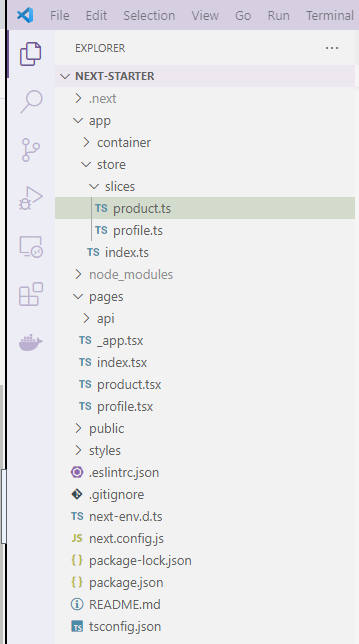
In store/index.ts you will have the store configuration
import { configureStore, ThunkAction } from '@reduxjs/toolkit';
import { createWrapper } from 'next-redux-wrapper';
import { Action } from 'redux';
import profileReducer from './slices/profile';
import productReducer from './slices/product';
const makeStore = () => configureStore({
reducer: {
profile: profileReducer,
product: productReducer
},
devTools: true
});
export type AppStore = ReturnType;
export type AppState = ReturnType;
export type AppThunk = ThunkAction;
export const wrapper = createWrapper(makeStore);
In store/slices/profile.ts
- The HYDRATE action is important as it makes sure the state is passed from the server to the client side on refresh
- All pages with getServerSideProps call the HYDRATION action on the client as well; This means that you need to make sure you don't override the client state with empty data, by checking if you have data in the action payload. More about this, [here](https://github.com/kirill-konshin/next-redux-wrapper);
import { createSlice } from '@reduxjs/toolkit';
import { HYDRATE } from 'next-redux-wrapper';
import { AppState, AppThunk } from '..';
export const ProfileSlice = createSlice({
name: 'profile',
initialState: {
name: null
},
reducers: {
setProfileData: (state, action) => {
state.name = action.payload;
}
},
extraReducers: {
[HYDRATE]: (state, action) => { // IMPORTANT - for server side hydration
if (!action.payload.profile.name) { // IMPORTANT - for not overriding data on client side
return state;
}
state.name = action.payload.profile.name;
}
}
});
export const { setProfileData } = ProfileSlice.actions;
export const selectProfile = (state: AppState) => state.profile;
export default ProfileSlice.reducer;
In store/slices/product.ts
import { createSlice } from '@reduxjs/toolkit';
import { HYDRATE } from 'next-redux-wrapper';
import { AppState, AppThunk } from '..';
export const ProductSlice= createSlice({
name: 'product',
initialState: {
name: null
},
reducers: {
setProductData: (state, action) => {
state.name = action.payload;
}
},
extraReducers: {
[HYDRATE]: (state, action) => {
console.log('HYDRATE', action.payload);
if (!action.payload.product.name) {
return state;
}
state.name = action.payload.product.name;
}
}
});
export const { setProductData } = ProductSlice.actions;
export const selectProduct = (state: AppState) => state.product;
// You can do async http calls with thunks
export const fetchProduct =
(): AppThunk =>
async dispatch => {
const timeoutPromise = (timeout: number) => new Promise(resolve =>
setTimeout(resolve, timeout));
await timeoutPromise(1000);
dispatch(
setProductData('BA DUM DA THUNK')
);
};
export default ProductSlice.reducer;
In _app.tsx
import '../styles/styles.scss';
import type { AppProps } from 'next/app';
import { wrapper } from 'app/store';
function MyApp({ Component, pageProps }: AppProps) {
return ;
}
export default wrapper.withRedux(MyApp);
In pages/index.tsx
import type { NextPage } from 'next'
import Head from 'next/head'
import Image from 'next/image'
import { useSelector } from 'react-redux'
import Link from 'next/link'
import { wrapper } from 'app/store'
import styles from '../styles/Home.module.css'
import { selectProfile, setProfileData } from 'app/store/slices/profile'
const Home: NextPage = (props: any) => {
const { resolvedUrl } = props;
const profile = useSelector(selectProfile);
return (
)
}
export const getServerSideProps = wrapper.getServerSideProps(store => async () => {
return {
props: {}
}
})
export default Profile
In pages/product.tsx
Mostly the same as in index, except you can use connect to select the data from the store; You map the state to the component props.
You also dispatch the thunks as you would dispatch any action; Just don't forget to await for the dispatch.
import { connect } from 'react-redux';
import { AppState, wrapper } from 'app/store';
import { fetchProduct } from 'app/store/slices/product';
const Product: NextPage = (props: any) => {
const { product, profile } = props;
return(